Showing posts with label Roms World ||. Show all posts

Download & Install iOS7 Custom ROM on Galaxy Y GT-S5360

0

iOS7 Custom ROM  Samsung Galaxy Y is one of most popular low budget android phone with decent specification and high build quality. This mobile is very popular among Android Developers too, many ROM’s are made for this and all worked very well. Now, you can have iOS 7 interface and feel on you phone too by installing iOS7 Custom ROM on Galaxy Y GT-S5360 smartphone. This Custom ROM features almost same looks, feels and features as original iPhone does.
Features of  iOS7 Custom ROM
  • Very stale ROM based on latest precy cm7.2
  • Themed like IOS
  • IOS7 alike ControlCentre
  • Modified Popup menu,text fields,volume up and down and others to look like IOS
  • Apps  are resized to fiexed to fit in Galaxy y screen
  • and much more
  • Flash ROM  and explore yourself
Requirements:
  • Make sure you have already rooted your device.
  • Make sure you phone is charged more than 30%
  • Make sure you have backup your mobile data such as application(if needed), SMS, MMS, Contacts saved on mobile and other personal data.
  • Enable the USB Debugging in your mobile by following these steps, Go to setting> application> development and check USB debugging box.
  • You must install mobile drivers using kies, download it here: Kies
Downloads
Important: To install iOS7 Custom ROM on Galaxy Y GT S5360 successfully you need to flash kernel file (Precy cm7.2 kernel.tar) using odin program. Here are steps to do that:

How to flash Precy cm7.2 kernel.tar to Samsung Galaxy Y

  • Firstly download the Odin Software here.
  • Unzip the Odin zip file to desktop and run “Odin3 v3.07.exe” file.
  • Now turn off your device and boot to download mode via pressing and holding “Volume down + Home Button + Power key” simultaneously until phone boot to download mode.
  • Connect your device to computer and make sure Odin software detect it. On Odin program ID:COM section to turn blue, it means you are doing right.
  • Now from Odin program check PDA check box  and on PDA select Precy cm7.2 kernel.tar file and then click on start button.
  • Wait for the completion of installation and when it completes , it will display “pass” message and “ID:COM” will turn to green indicating that everything is fine. Now follow further steps.

How to Install iOS7 Custom ROM on Galaxy Y GT-S5360

  1. Download iOS7 Custom ROM  and  Gt-S5360 CWM.zip  and put them into the SD, make sure to put them in root directory instead of any sub folder.
  2. Turn off your phone and connect it PC or computer.
  3. Now press and hold “Volume up + Home Button + Power key” simultaneously until phone boot to recovery mode.
  4. Now from recovery mode menu, select “install zip from SD card“, and select Gt-S5360 CWM.zip and press home button to confirm it and this will take you to new recovery mode.
  5. Now from recovery options, perform below listed operations (all are compulsory and don’t skip any of them)
    1. Select “Wipe data/Factory reset”, then select “Yes” on the next screen to confirm it.
    2. Select “wipe cache partition“, then select “Yes” on next screen to confirm your selection.
    3. Go back main menu of recovery and then go to “Mounts and Storage“, mount the following: mount system, mount cache and mount data. 
    4. Go back main menu of recovery and then go to Mounts and Storage-> “Format System” and select “Yes” on the next screen to confirm.
    5. Go back main menu of recovery, again, and go to “Advanced”->”Wipe Dalvik Cache” and select Yes from the next screen to confirm it.
  6. Now, its time to install ROM, go back to menu and again “select install zip from SD card” and select your custom ROM zip file and tap home button to confirm and it will take little time to install.
  7. After all done, go back to menu and select “wipe data cache” and select “wipe data/factory reset” and then reboot system now.
WIFI fix - If Wi-Fi is not working after installation then follow this guide other wise avoid this step : Fix Wifi on Samsung Galaxy Y [Update: 17-11-2013] Network & any other problem fix – We have gather some problems of people’s who are having some Network problems like can’t receive calls and text. We have tried many trail to solve and finally factory reset is found to be working.

Here are steps to fix network and other problems:

  1. Go to settings-> Backup & restore
  2. Select Factory data reset and perform it.
  3. When it completes, restart your phone.
This method is seems to be working fine, we have tried on two phones and it worked. Check if any problem is still exist in your phone. You have successfully installed iOS7 Custom ROM on Galaxy Y GT-S5360. If you have any problem while installing this custom ROM on you phone then let us know via comments.


How to root Samsung Galaxy Grand Quattro GT-I8552

0

How to root Samsung Galaxy Grand Quattro GT-I8552

Disclaimer: This guide is intended as a helpful how to. dotTech and its writers are not responsible for any gain or loss (including but not limited to bricked devices) incurred as a result of following this guide. Root your device at your own risk. Rooting may void your warranty. 

REQUIREMENTS

This root guide is meant for the Samsung Galaxy Grand Quattro, model number GT-I8552, running Android 4.1.2 Jelly Bean firmware. You can confirm the model number and Android version by going to Settings > About Device on your phone or by checking the packaging box labels. Do not try this method on any other phone models.

BEFORE WE BEGIN

Download the following Rooting package, based on your device model number and save it to your desktop

Step 1 – INSTALL CWM RECOVERY ON GALAXY GRAND QUATTRO

  • First of all, download and install the Samsung USB drivers on your PC
  • Next download the CWM recovery tar file from above, and save it to your desktop
  • Connect your phone to PC via USB cable and transfer the Rootkit zip file from the folder you extracted in Step 2 to the internal memory of your phone
  • Download the ODIN package and extract it to your desktop too
  • Disconnect the phone and power it off
  • Open the ODIN folder you extracted in Step 4 and run the Odin3 exe file as administrator
  • Now power on your phone while pressing the Volume Down + Home + Power buttons at the same time. This will boot your phone into Download Mode
  • Now plug in your phone to the PC. You should see an Added! message in the Odin window
    Device Added Odin
  • Click the PDA button in ODIN and load the recovery.tar.md5 file from your desktop
  • Leave everything else in ODIN as it is. Check screenshot below for confirmation
    ODIN Setup
  • Double-check everything in ODIN and click the Start button to start flashing the CWM recovery image on to your device
  • Once the flashing is complete, you should see a Green PASS message at the top left in ODIN. It is now safe to disconnect your phone. CWM Recovery has been flashed on your device

HOW TO ROOT SAMSUNG GALAXY GRAND QUATTRO

  • Once your phone has rebooted, connect it to your PC via USB cable
  • Transfer the SuperSu zip file you downloaded earlier to the SD card on your phone
  • Power off your phone
  • Reboot to CWM Recovery. To do so press and hold the Volume Up + Home + Powerbuttons together. Release them when you see the CWM screen. In CWM mode, use the Volume Up/Down keys to scroll and the Power or Home key to select an option
  • Select Install zip from SD card, and on the next screen select Choose Zip from SD card
  • You should now see a bunch of folders and files. These are the contents of your internal SD card. Locate the SuperSU_v1.65.zip file you copied over earlier and select it with the Power button
                     CWM Recovery Flashing Steps
  • On the next screen, select Yes to confirm the flash
  • Wait for CWM to flash the root package
  • Once done, Go Back to the main menu and select Reboot System Now
  • After your phone has booted up fully, open the App drawer and look for the SuperSU app.
  • Congratulations!! Your Galaxy Grand Quattro now has full root access as well as the custom CWM Recovery installed!
Enjoy.. Your device is rooted now..

You may also like:


franco Kernel updater 10.1.0.1

0

A well established top-100 paid app with one of the highest ratings in the Play Store!
With a powerful and beautiful UI it combines a series of powerful tools to manage your device with franco.Kernel. Basic functionalities such as Backup & Restore or CPU frequencies will work independently of the Kernel for the supported devices.

Minimum Requirements: Android OS 4.0 and up

franco Kernel updater 10.1.0.1 franco Kernel updater 10.1.0.1

If you desire to help out visit this Crowdin link: crowdin.net/project/francokernel_updater . This service costs me $18,5 a month because I believe its very helpful for the app users to have the application translated into their languages.

Thanks for all the contributions!

Take note that your device needs to be ROOTED. I don't accept refunds if you fail to read this warning.
This application supports the following devices:
* Galaxy Nexus - 4.0.3, 4.0.4, 4.1, 4.1.1, 4.1.2, 4.2, 4.2.1, 4.2.2
* Asus Google Nexus 7 - 4.2, 4.2.1, 4.2.2
* LG Nexus 4 - 4.2, 4.2.1, 4.2.2
* Samsung Nexus 10 - 4.2, 4.2.1, 4.2.2

Common functionalities available in all devices:
* Deep integration with franco.Kernel
* Check for new franco.Kernel versions
* Auto flash Kernels directly into the device without any user input besides requiring a reboot
* Download .zips to be flashed in recovery
* 4 different themes based on Google's UI guidelines: StockHolo, DarkHolo, BlueHolo and GreenHolo (check screenshots)
* Interface to change CPU clocks and governor
* Interface to change the CPU governor parameters
* Backup & Restore Kernels on the fly without any "geek" knowledge
* Custom Kernel settings such as: IO scheduler, IO scheduler tuning, TCP congestion algorithm and options to turn logging off
* Power Modes where anybody can create special profiles for certain ocasions
* A System Monitor with a beautiful UI courtesy of the developer Christian Göllner

Special functionalities depending on the device in question:

Galaxy Nexus:
* Checks and downloads Imoseyon's kernel
* Voltage control interface
* Color Control - You're able to change Gamma values and Color Multipliers to achieve the best color reproduction
* Color Profiles interface - create your own presets and load them up when you want
* Wi-fi special mode to boost signal during streaming while on screen off
* More Kernel settings: fsync on/off, USB Fast Charge, BLX, Thermal Throttling tuning
* Sound Control: hear music louder and with better quality

Nexus 7
* Interface to change GPU clock
* Full control over the CPU cores behavior
* Voltage control
* Wi-fi special mode to boost signal during streaming while on screen off
* Enable/disable Tegra Screen Dimmer

Nexus 4:
* Color control which includes: interface to change the RGB multipliers and full Gamma interface to tweak greys, blacks, mids, whites, contrast, saturation and brightness
* Color Profiles interface - create your own presets and load them up when you want
* Full control over the CPU cores behavior
* Improve sound quality by reducing/increasing headphones and headset gains
* Option to tune the Haptic Feedback strength
* USB Fast Charge

Banner and icon courtesy of Lab75

DISCLAIMER
I take no responsibility for any fault or damage caused by any procedures of the app. No warranties of any kind are given.

Upcoming features in the next weeks (no ETA):
* Will use the Navigation Drawer to navigate between activities
* CPU voltage profiles
* Re-code of the Power Modes infrastructure
* Widgets for some key sections of the app

What's New in this version:
v10.1.0.1
* Fix some FC's. If you still have FC when you open the app just clear the app data, for some reason theres some items that might be conflicting with the old version and this newer version that I can't catch, and for that I apologize

franco Kernel updater Video:


franco.Kernel updater App Screenshots:

franco Kernel updater 10.1.0.1 franco Kernel updater 10.1.0.1

if you enjoy this application please consider buying the original pro version from market to support the development


Download franco.Kernel updater 10.1.0.1

Uploaded

franco Kernel updater 10.1.0.1


Rapidgartor

franco Kernel updater 10.1.0.1


Follow Me and Mention If This Not Work >> @Androidspot


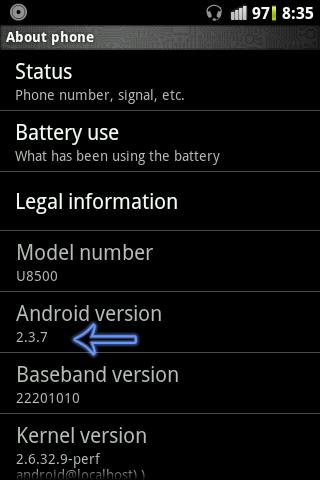
Install Android 2.3.7 in your Huawei U8500

0

android 2.3.7 in u8500 about phone Install Android 2.3.7 in your GP Crystal/Huawei U8500 


Procedure to update Android 2.3.
require downloads
  1. SuperOneClick v2.2 – Root Android Phone
  2. Clock Work Mod recovery 2.35
  3. Rom[CyanogenMod 7.

SOC[super one click]

Super one click application using for rooting android device. To make Clock work mod workable in your gp crystal, you have root your device first. After downloading Super one click unzip it in another folder.
From your gp crystal, go to setting > application > development. Then enable USB debugging from development option. Connect your device with pc. Open Super One Click program from unzipped folder. Click on Root and wait until your device restart. Go to menu and find out Superuser. if you saw superuser, you have successfully rooted your device.

Clock Work Mod

To install new image in boot menu, switch off crystal. Then connect this device with pc and press Volume down(-) key + Call end button. Open Clock work mod in your pc and wait until it copied to your device. After completing this process,  close open program[clock work mod] in your computer.

Rom[Cyanogen Mod 7.2

The fastest rom for Huawei U8500/Gp crystal is Cyanogen Mod 7.2 and it’s only 88 mb. Just download and copy it in your device memory card. You are almost 50% done.

Final Step

Switch off your device if it’s running/switched on. Press power button by holding Volume Up(+) key + Call button. You will see something like matrix. after you will see a menu. Select install zip from sdcard > choose zip from sdcard, then select “CyanogenMod 7.2-Release Candidate 1.zip“. After completing update, reboot your gp crystal from this menu. You are done!!!
If you face any problem in this procedure, just tell us through comment.

After completing all steps from above, please keep your phone switched on for 15 minute. after completing 15 minute, remove battery from mobile and for 2 minute. Now try to start your phone


ICS(CM9) ROM For Huawei U8500 Download

0

ICS(Ice Cream Sandwich) is a latest version of Android operating system. It has lot’s of new features. Also has a great launcher called Trebuchet Launcher with CM(CyanogenMod) rom. CM using Trebuchet launcher as default in their upcoming ICS roms.
Home+of+Huawei+U8500+with+CM9 ICS(CM9) ROM For Huawei U8500 DownloadLock+of+Huawei+U8500+with+CM9 ICS(CM9) ROM For Huawei U8500 Download
Get ICS(Android ver: 4.0.4) on your Huawei U8500 device by completing following steps

1. Requirement to Get ICS in your device:-

  • Rooted huawei u8500 device.[learn how to]
  • CWM{Clockworkmod}/Recovery – Download
2.  Download cm-9-20120613-u8500-signed.zip
3. Finally check out them:
  • Wipe Data, Cache, Delvic cache
  • Install zip from sdcard
  • Choose from SD card
  • and browse your new update file.


[SPECIAL-ROM] Ydroid v2 ICS jelly Sensation With Hell-Lock

0

Ydroid v2.2 ICS JELLY SENSATION WITH HELLOCK
Features
  1. support swap
  2. support amarulls
  3. smooth
  4. more saving battery
  5. undervolt script
  6. deodexed
  7. new boot image
  8. kernel with hell fusion#80
  9. 75% transparant
  10. cwm permanent
Bug
I have not found bug yet.

Instalations
  1. Go cwm
  2. Wipe data
  3. Wipe cache
  4. Mount & storage
    -change Mount SYSTEM become UNMOUNT SYSTEM
    -change Mount DATA become UNMOUNT DATA
  5. INSTAL zip >>> choose ydroid v2.zip
  6. Back to menu
  7. Choose advance
  8. Reboot recovery
  9. Wipe data
  10. Wipe cache
  11. Reboot system
Download link
4shared : ydroid_v2.2_with_hell-lock80.zip


[ROM][GPL] [CM 10.1] Xperia Z V1 For Samsung Galaxy Mini Gts5570

0

---About The Rom---

*What just began as a simple random search for the real Xperia Z launcher in Apps and Games sections to try on my Mini, I decided to make a complete morph of Sony Xperia Z. Its based on latest nightly of CM 10.1 by androidarmv6 team. Its already 70% themed to look like Xperia Z, so expect some quick updates for a final version. Remember this is not a simple theme.apk rom. I worked with png's and modded the CM10.1 to have this UI. So enjoy the ROM and post your review and also any ideas to make this better. And please tell me if my ROM's concepts are getting old or useless, so that I can stop it. I will try to get better*

          -----CREDITS-----

* AndroidArmV6 Team
*rohan007
*erickas
*TheWhisp
*Thillac for Real Xperia Z port for all
devices
*SpaceCaker for some tips on
themeing the system
*cyanogenmod team
and you for supporting The Developer


        -----Changelog-----

*Based on latest CM 10.1 JB 4.2
nightly
*Real Xperia Z Launcher with auto-
rotation enabled
*Real Xperia Z Weather Widget
*Real Xperia Z Clock widget bundle
*Real Xperia Z Recents call widgets
*Real Xperia Z Music widget
*Real Xperia Z notes app widgets
*Real Xperia Z TackID music app
*Real Xperia Z quick/on-off toggle
widgets
*Real Xperia Z Full icon set
*Real Xperia Z notes app
*Official Sony Xperia Z default
wallpaper
*Real Xperia Sola keyboard
*Sony Xperia S fonts
*Fully modded settings
80% modded systemUI and
framework
*New navigation bar keys from Xperia
S
*No theme used, only its parts/png's
*Multi language support
*Modded MIUI msuic player to look
like Sony Walkman app
*Some media tones from Xperia Sola
Fast and smooth
*awesome battery
*70% is themed
*so expect 1 or 2 updates with major
changes, from then only update to
latest nightly when available
*Many more to come in next update
        -----DOWNLOAD-----
  -----How To Flash The Rom-----
*wipe Data
*Wipe Cache
*Install.Zip
*Wipe Cache
*Reboot sys
.... Cwm Must be Installed
NOTE :Do At Your Own Risk..!!!
   This Rom Is Passed From XDA
Follow Our Fanpage At Facebook
               AndroidSpot

ScReEnShOtS


[ROM] [CM10.1][OTA] miniNUX v1

0

  ------Word By Developer------

Hi guys! How I announced some time
ago, I'm back to the attack with a
new rom based on CM10.1
As in the previous project Touchwiz
style is the host, but this time the
theming is really high-level and
performance too.

COMPOSITION OF ROM:

-Based on cm10.1 RC3 of
AndroidArmv6 Team
-New Badass Kernel 1.6 by alin.p
-Added Pure Audio v1 by jeeko
-zRam script
-zzminfree script
-INT2ext+ modded by mnemonyc
-ActivoSpeeder v3.3 by F4uzan
-Adrenaline Engine v4.4 and
Adrenaline Boost by ImbaWind
-Launcher S3 (there are some
grafical imperfaction)
-S4 default wallpaper
-Light stock keyboard
-Browser stock
-Apollo partially themed in Touchwiz
style
-S3 Calculator
-SystemUI totally themed in
Touchwiz style (S3/S4)
-Settings S3 (soon new version in S4
style)
-New layout of dialer
-App sms/mms themed in S4 stayle
-New Samsung Apps
-S3 task manager
-AOKP Camera partially themed in
S4 stuyle
-Manager Recent Apps in Sense 4
style

        *****Credits*****

-Rohan007, erikcas, and
-AndroidArmv6 for the base;
-A_U and alin.p for kernel
-ImbaWind for Adrenaline Engine and
-Adrenaline Boost
-Jeeko for Pure Audio
-F4uzan for Activo Speeder
-icebbar for TouchWiz 5 Launcher
mnemonyc.
                DOWNLOAD
  ---How To Install The Rom---
*Install CWM & TWRP Recovery
*Do Wipe Data
* Do Wipe Cache partition
*Select Install Zip From Sd Choose  Rom zip
* Wait Till The Zip Will Be Install...
*Do Wipe Cache
*Do Reboot System
ENJOY the Rom 
-Share Your Experince With My Blog-
ScReEnShOtS....


[ROM] [UNOFFICIAL] STABLE Cyanogenmod 10.1 RC5 For Samsung Galaxy Mini GT-S5570

0


[ROM][EXPERIMENTAL][AOSP ICS
4.0.4] New Experience


About This ROM :

WORKING : EVERYTHING

Bug : NONE


DOWNLOAD ROM : Click Here To Download


<<< INSTRUCTIONS HOW TO INSTAL >>>

1. Must Install Custom Recovery ( CWM Recovery Or TWRP Recovery )
2. Boot on Recovery Mode Shutdown The Device Press Middle Key + Lock Key
4. Do Wipe Data
5.Wipe Cache Partition
6.Install Zip From Sd card >Choose Zip from Sd Card > Select The ROM
7.Wait Till The Zip Will Be Install
8.Wipe Cache Partition
9.Reboot System Now.
10. Enjoy.


<<< SCREENSHOTS >>>


[ROM][4.2.2|CM10.1]Jelly Beer 4.20 [DPI Groups][BeerGang][18 Mayl][Unofficial]

0


Features
+ Based on CM-10.1
+ PA's hybrid engine for a full user experience
+ Switch between three different UI modes
+ Change the system DPI
+ Add apps to different DPI groups
+ Change the navigation bar height
+ No reboot needed for UI changes
+ More features and improvements
+ This is always a work in progress


Downloads and installation
+ Download the ROM from here
+ Download the GApps from here OR Banks GApps
+ Copy the ROM to the SD
+ Copy the GApps to the SD
+ Install the ROM and the GApps and
+ If you are already in JellyBeer, do a cache wipe and dalvik cache wipe
+ If you come from any other ROM, do a wipe data
+ Reboot


Changelog

+ BeerGang's github for a complete changelog
+ Per App Layout
+ Clock Mods
+ Notification Background
+ Circle Battery Tweaks
+ Wake up when device is plugged or no
+ Fixed Hiding clock and it going from top of notifications
+ CRT Off Animations
+ Notification Behaviours
+ AOKP navigation bar
+ Latest CM10.1 Merges
+ and maybe more.


[GApps][Unofficial][4.2.2][6-16-2013]

1


Smaller, bloat free
*To get Google Now offline voice recognition working aka hotword detection download the language pack within Google Now itself.*
-Two different packages to choose from: Keep in mind if its not in the GApps zips, it can be downloaded from the Google Playstore.
1. The main GApps package in which most people will probably use.
2. A Minimal GApps package only containing Playstore with syncing stuff.
-There is also a Stock Emoji Addon.
-There is also a Photosphere Camera addon.
-There is also a GenieWidget addon.
-For Multi Dpi use this: Multi Dpi Playstore
-For TRDS GApps to use with Dark Toogle use the Slim ROM GApps: Slim GApps


Downloads


For md5 checksum you can view the Goo.im link.
-Goo.im folder with downloads
-Mirror provided by T.Longren


[MOD][ICS|JB][Inverted|Normal] Multi DPI Play Store v4.1.10

0

Follow these steps if you have problems like certain apps not showing up in play store(e.g. facebook,beautiful widgets),shows incompatiblity error,etc.

1. Flash the zip file and reboot.
2. In Settings->Apps->All clear data of Play Store and Google Services Framework then reboot.
3. Open Play Store, if it gives error then clear data of Play Store and open Play Store again then hit accept.
4. If ur apps doesn't show up under installed apps in play store after installing this fix then reboot once and u should see it afterwards.
5. If above steps didn't fix ur issues then remove Google account,reboot and relogin.


Screenshots:


 Downloads


Play Store v4.1.10:

White Multi DPI Play Store v4.1.10 for ICS- Download
White Multi DPI Play Store v4.1.10 for JB v4.1.2- Download
White Multi DPI Play Store v4.1.10 for JB v4.2.2 - Download
Inverted Multi DPI Play Store v4.1.10 for ICS- Download
Inverted Multi DPI Play Store v4.1.10 for JB v4.1.2- Download
Inverted Multi DPI Play Store v4.1.10 for JB v4.2.2 - Download


Play Store v4.1.6:

White Multi DPI Play Store v4.1.6 for ICS- Download
White Multi DPI Play Store v4.1.6 for JB v4.1.2- Download
White Multi DPI Play Store v4.1.6 for JB v4.2.2 - Download
Inverted Multi DPI Play Store v4.1.6 for ICS- Download
Inverted Multi DPI Play Store v4.1.6 for JB v4.1.2- Download
Inverted Multi DPI Play Store v4.1.6 for JB v4.2.2 - Download


Play Store v4.0.27:

White Multi DPI Play Store v4.0.27 for ICS- Download
White Multi DPI Play Store v4.0.27 for JB v4.1.2- Download
White Multi DPI Play Store v4.0.27 for JB v4.2.2 - Download
Inverted Multi DPI Play Store v4.0.27 for ICS- Download
Inverted Multi DPI Play Store v4.0.27 for JB v4.1.2- Download
Inverted Multi DPI Play Store v4.0.27 for JB v4.2.2 - Download


Play Store v3.10.14:

White Multi DPI Play Store v3.10.14 for ICS- Download
White Multi DPI Play Store v3.10.14 for JB v4.1.2- Download
White Multi DPI Play Store v3.10.14 for JB v4.2.2 - Download
Inverted Multi DPI Play Store v3.10.14 for ICS- Download
Inverted Multi DPI Play Store v3.10.14 for JB v4.1.2- Download
Inverted Multi DPI Play Store v3.10.14 for JB v4.2.2 - Download


Related Posts Plugin for WordPress, Blogger...
 

Download Android Apk Games with Datafiles Copyright © 2010 LKart Theme is Designed by Lasantha